


Hirschmann MSP30-08040ECUY99HHE2A cabinet and media-module planning
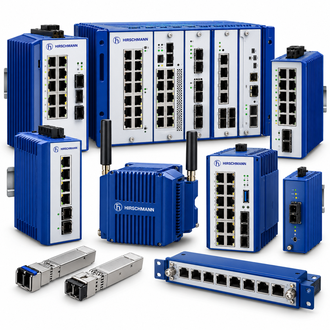
Hirschmann MSP30-08040ECUY99HHE2A is a modular managed DIN-rail switch in the MSP30 modular rail switch range. The complete designation matters for purchasing and receiving. The shared Hirschmann collage is a reference image showing product families, not an exact photograph of this configured unit.
Key technical data
| Technical item | Verified value / selection note |
|---|---|
| Complete designation | MSP30-08040ECUY99HHE2A |
| Family | MSP30 modular rail switch |
| Product form | modular managed DIN-rail switch |
| Mounting | DIN-rail cabinet installation |
| Media | Actual ports depend on installed MSP media modules |
| Host power | Verify full supply option and cabinet wiring |
| Software | Preserve VLAN, redundancy and alarm configuration |
| Assembly check | Record every fitted module and terminal |
| Selection rule | Verify the complete printed code and manufacturer record for the installed version |
Where this item fits
For MSP30-08040ECUY99HHE2A, start with the equipment already installed and the role it performs in the network or cabinet. Photograph the populated modules and terminal blocks before comparing any MSP30 configuration code. The visible type name identifies the enquiry; the actual site wiring, accessories and software determine whether the offer fits.
Do not assume MSP30-08040ECUY99HHE2A can substitute for another member of the MSP30 family. Similar model strings can represent different interfaces, environmental options, power inputs or software packages. Preserve the installed label photograph and the manufacturer's record with the purchase request.
Similar-looking model references
The following designations resemble MSP30-08040ECUY99HHE2A and are grouped here for search and enquiry convenience. They are not automatically interchangeable with MSP30-08040ECUY99HHE2A; confirm each complete code, function and interface before buying.
Specification and ordering checks
When requesting MSP30-08040ECUY99HHE2A, provide quantity, condition requirements, the complete printed code and any available order number. Capture VLAN, redundancy and alarm settings so the assembled replacement restores the real network behavior. Ask the supplier to state what is included, especially modules, connectors, optics, licenses, mounting parts or power components where applicable.
A quotation for MSP30-08040ECUY99HHE2A should separately identify the manufacturer's stated specification and any seller-proposed substitution. Check physical fit, electrical supply and connected media before approving that substitution. If the source code has an option placeholder, confirm the actual production revision on the device label.
Installation and acceptance
Before servicing MSP30-08040ECUY99HHE2A, record existing wiring, port assignments, operating status and configuration where applicable. Use the manufacturer's installation procedure and the site's authorized maintenance window. Record the pre-change state so the equipment can be restored if the replacement does not pass acceptance.
After MSP30-08040ECUY99HHE2A is installed, check the relevant power, link, alarm and application behavior against the original baseline. File the serial number, final code, test result and any approved deviation together. Successful power-up alone does not prove functional equivalence.
Interface and system context
When evaluating Hirschmann MSP30-08040ECUY99HHE2A, identify the connected host or neighboring equipment first. Managed modular MSP family; actual ports depend on assembled modules. Document cable or module positions, the cabinet layout, and the normal operating state. This turns MSP30-08040ECUY99HHE2A from a text-only enquiry into a configuration that can be checked against the manufacturer's information.
For MSP30-08040ECUY99HHE2A, note which components are included in the offered assembly. A switch base, optical module, wireless radio, connector, power unit or fan cannot be evaluated from its family name alone. Compare the actual interfaces and accessories with the site bill of materials before approving an alternative.
Replacement decision
The key replacement question for MSP30-08040ECUY99HHE2A is whether the installed function will be restored without changing the design intent. Photograph the populated modules and terminal blocks before comparing any MSP30 configuration code. Keep photographs of the full label, any revision marking and the current network or wiring diagram in the service record.
Ask the supplier to confirm the exact MSP30-08040ECUY99HHE2A designation in writing. Capture VLAN, redundancy and alarm settings so the assembled replacement restores the real network behavior. If a related-looking code is proposed, compare it as a separate variant and record the reason it is acceptable. After receipt, inspect physical condition and test the item in the intended host or network under the approved procedure.
Buyer handover
For MSP30-08040ECUY99HHE2A, retain the written offer, manufacturer identification and received-item inspection. Clarify availability, warranty or return terms and whether the item is new, refurbished or a tested spare. A complete handover reduces the risk of ordering a similar-looking but unsuitable MSP30 variant.
