


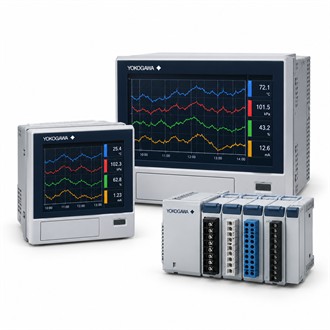
Choosing Yokogawa FX1006-7-2-H/C7/USB1/CC1 for the Installed Application
Yokogawa FX1006-7-2-H/C7/USB1/CC1 is listed as paperless recorder. This selection brief places the main product data first, then outlines the checks needed to confirm the installed fit. Preserve the full FX1006-7-2-H/C7/USB1/CC1 code through quotation, receipt and maintenance records.
| Selection point | Specification / confirmation |
|---|---|
| Representative model | FX1006-7-2-H/C7/USB1/CC1 |
| Product family | FX1006 |
| Listed product | FX1006 Paperless Recorder |
| Representative code | FX1006-7-2-H/C7/USB1/CC1 |
| Configuration review | Recorder family |
Application and model fit
Yokogawa FX1006-7-2-H/C7/USB1/CC1 is listed as a DAQSTATION paperless recorder configuration. Verify the input and option set against the recording task. For Yokogawa FX1006-7-2-H/C7/USB1/CC1, start with the equipment nameplate, the application requirement and the connected system. Keep the complete FX1006-7-2-H/C7/USB1/CC1 code in the enquiry so the supplied version is not confused with a similar family member or an accessory with a different function. Include Yokogawa FX1006-7-2-H/C7/USB1/CC1 in the recorded selection decision so option suffixes remain traceable.
Configuration review
Review channel count, signal types, recording interval, communications, data export, display/options, supply and mounting. Compare the full Yokogawa FX1006-7-2-H/C7/USB1/CC1 designation with the installed hardware, signal or process interface, mounting and environmental conditions. Confirm each option against current manufacturer documentation; do not infer a code feature from appearance or a shortened model name. Clarify what is included with FX1006-7-2-H/C7/USB1/CC1 and which supporting items are separate. Include Yokogawa FX1006-7-2-H/C7/USB1/CC1 in the recorded selection decision so option suffixes remain traceable.
Checks to close before release
- Complete model code and nameplate
- System/sensor/process compatibility
- Option and package-scope confirmation
- Installation and measurement verification
Commissioning notes
For Yokogawa FX1006-7-2-H/C7/USB1/CC1, use the full code in the work order, instrument index and purchase enquiry. Compare the delivered configuration with the nameplate and approved documents before installation. Record deviations for review rather than assuming interchangeability from a shared family prefix. Include Yokogawa FX1006-7-2-H/C7/USB1/CC1 in the recorded selection decision so option suffixes remain traceable.
Information for procurement
Quote the exact Yokogawa FX1006-7-2-H/C7/USB1/CC1 code, quantity, equipment tag, operating service, required interfaces and delivery scope. Attach the nameplate image, instrument datasheet and wiring or process drawing where available. Confirm whether accessories, cables, sensors, converters, licenses or calibration documents are included with FX1006-7-2-H/C7/USB1/CC1 or must be supplied separately.
Related configurations
- FX1006-7-2-L/A1/M1
