


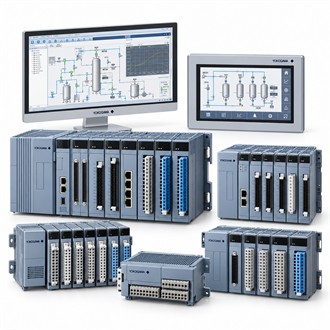
Application and system fit for Yokogawa NFDV151-P60/CCC01
Yokogawa NFDV151-P60/CCC01 is a CENTUM VP digital input module. This page puts the product identity and system checks first so the complete configuration can be compared with the installation. Use the exact code NFDV151-P60/CCC01 in the enquiry and verify it against current manufacturer documentation.
| Selection point | Specification / confirmation |
|---|---|
| Representative model | NFDV151-P60/CCC01 |
| Product | CENTUM VP digital input module |
| Input schedule | Confirm point states and channel mapping |
| System fit | Station, terminal and cable compatibility |
| Verification | Signal transitions and diagnostics |
Application
Review the complete NFDV151-P60/CCC01 code with the terminal hardware, field cable, station revision and configuration. Confirm circuit supply, commoning, isolation and signal state conventions from the approved design. Keep Yokogawa NFDV151-P60/CCC01 distinct from associated terminal boards and field devices in the purchase scope. Keep the full Yokogawa NFDV151-P60/CCC01 designation attached to the equipment tag, system drawing and purchase documentation. This helps distinguish NFDV151-P60/CCC01 from a similarly named module or a package that includes additional hardware.
Interface check
NFDV151-P60/CCC01 is listed as a CENTUM VP digital input module. Establish the field contact or discrete signal schedule, expected states and module allocation for the installed station. For Yokogawa NFDV151-P60/CCC01, verify the exact channel and interface characteristics from the product specification and the current system drawings. Keep the full Yokogawa NFDV151-P60/CCC01 designation attached to the equipment tag, system drawing and purchase documentation. This helps distinguish NFDV151-P60/CCC01 from a similarly named module or a package that includes additional hardware.
Pre-order review
- Field-device contact states and tags
- Module/terminal/cable combination
- Circuit supply and commoning
- Functional test and restoration record
Acceptance and records
A post-installation check for NFDV151-P60/CCC01 should verify contact transitions, point mapping and diagnostic behavior under an approved test condition. Record the affected tags and terminal assignments, then restore any bypasses or inhibited points. Retain this evidence with Yokogawa NFDV151-P60/CCC01. Keep the full Yokogawa NFDV151-P60/CCC01 designation attached to the equipment tag, system drawing and purchase documentation. This helps distinguish NFDV151-P60/CCC01 from a similarly named module or a package that includes additional hardware.
Before the order is released
For Yokogawa NFDV151-P60/CCC01, provide the quantity, delivery requirement, complete order code, equipment tag and reason for purchase. Identify the associated station, sensor, converter, cable, terminal board or other connected equipment, as applicable. State which accessories and technical documents must be included. Compare the offered NFDV151-P60/CCC01 configuration with the approved requirement before releasing the order, and clarify any proposed substitute or deviation in writing.
Final checks at receipt
At receiving inspection, verify Yokogawa NFDV151-P60/CCC01 against the order and nameplate, then check package contents and requested documentation. Before installation, confirm that the code matches the system drawing and the intended location. If a mismatch is found, pause the change and have it reviewed by the responsible engineer. Retain the supplied model, system revision, configuration, test evidence and restoration notes together so future support for NFDV151-P60/CCC01 can be based on the equipment actually installed.
